The free PDF editor that does it all.
Edit text, sign, fill forms, convert to Word, Excel & PowerPoint, merge, compress and redact — right in your browser or on Windows. No account. No watermark. No limits.
Also free for Chrome & Edge →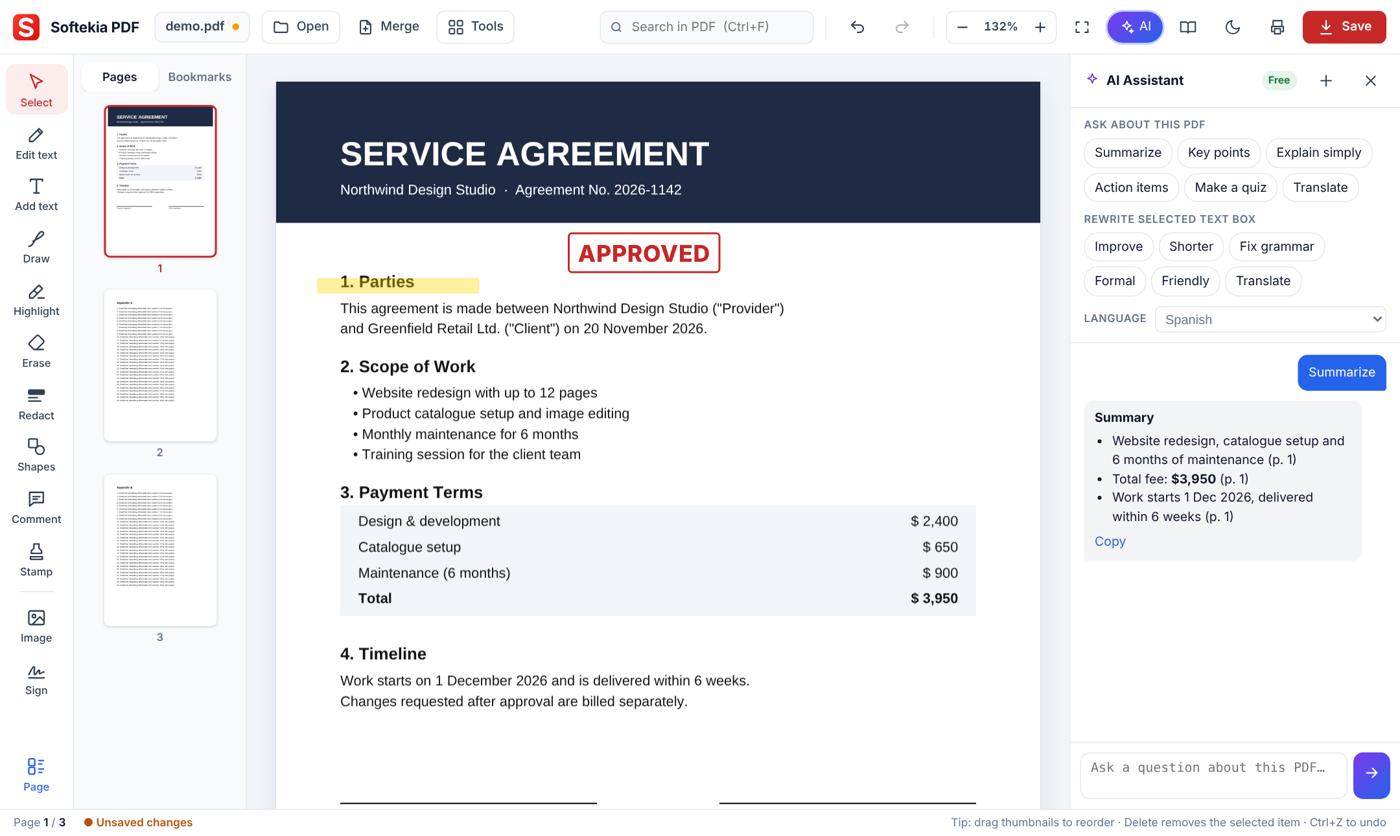
Every PDF tool you need — free
The same tools others charge for every year. Click any tool to start.
Edit & annotate
Sign & protect
AI editing is on the way
Soon a built-in AI assistant will read your document with you, answer questions and rewrite text right on the page.
- Chat with your PDFAsk questions and get answers with page references.
- Summarize & key pointsTurn 50 pages into the 8 lines that matter.
- AI rewrite on the pageImprove, shorten, fix grammar or change the tone of any text.
- TranslateTranslate the whole document or a single line into 20 languages.
- 12-month service term, auto-renews
- Either side can end it with 30 days' notice
- Fees are fixed for the first year
Same tools. $0.
What people pay each year for a PDF editor — and what Softekia PDF costs.
| Softekia PDF | Desktop editors | Online PDF sites | |
|---|---|---|---|
| Edit text, sign, annotate | |||
| Convert to Word / Excel / PowerPoint | |||
| AI chat, summary & rewrite | paid add-on | paid plan | |
| No sign-up, no account | |||
| No watermark, no daily task limit | paid only | ||
| Files stay on your device | |||
| Price | Free | from $155/yr | from $108/yr |
Prices are public list prices for one person's annual plan (Nov 2026) and can vary by country and offer. Product names belong to their owners.
Get Softekia PDF free — on any device
Windows app, Chrome extension or online. Same features, always free.
Windows app
A real installed desktop app. Double-click any PDF to open it.
- Set as your default PDF app
- Save and print directly
- Windows 10 / 11 · 64-bit
Chrome extension
Open from the toolbar, or right-click any PDF link on a website to edit it.
- Chrome and Edge
- “Open with Softekia PDF” menu
Online
Use it in your browser right now. Your files are processed on your device, never uploaded.
- Any computer
- Nothing to install
Install on Windows
- Open the downloaded
Softekia PDF Setup.exe. - If “Windows protected your PC” appears, click More info → Run anyway.
- Click Install — the icon appears on your desktop.
- Tick “Always open PDF files with Softekia PDF” to make it your default.
Add the Chrome extension
- Download the ZIP file and Extract it.
- Type
chrome://extensionsin the address bar. - Turn on Developer mode (top right).
- Click Load unpacked and pick the
Softekia PDFfolder.
Edit a PDF in 3 steps
No account, no learning curve.
Drop it in, or double-click it in Windows.
Click text to change it, add a signature, or let AI rewrite.
Download the finished PDF. No watermark, ever.
Frequently asked questions
Short answers to common questions.
Is Softekia PDF really free?
Yes. Every tool is free — no trial, no sign-up, no watermark and no daily task limit. An AI assistant is coming soon and will also be free to start.
Are my files uploaded anywhere?
No. Editing, converting, merging and every other tool run inside your own browser or the Windows app. Your PDF never leaves your device.
Can I edit the existing text in a PDF?
Yes. Pick Edit text and click any line — the old text is removed and you type the new text in place. It looks right on screen and in print.
Does Softekia PDF have AI?
An AI assistant — chat with your PDF, summaries, translation and one-click rewriting — is coming soon. Every other tool works right now, free.
Can I convert PDF to Word, Excel or PowerPoint?
Yes — from the Tools menu. Word and Excel keep the text editable; PowerPoint makes one slide per page.
Is redaction permanent?
Yes. Pages with redactions are saved as flat images, so the hidden text can't be selected, searched or recovered.
Why does Windows say “unknown publisher”?
The installer isn't code-signed with a company certificate yet. Click More info → Run anyway to install.
Edit your PDF now — it's free
No sign-up. No watermark. Start in 5 seconds.
 Softekia PDF